Web Services Settings during Project Modification
Once the WSI extension is added to the project, during the project modification you can configure the Web Services Settings for multiple WSI instances, including the instance name, the type of communication, web services port, and the host certificate.
By default one instance is configured, and you can click Add to add a new WSI instance. The allowed maximum WSI instances to be added is 10.
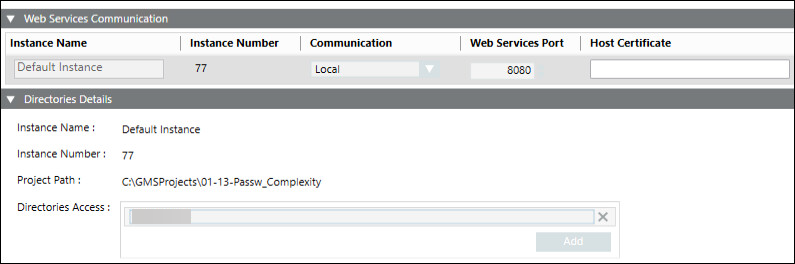
- Instance Name: Change the default to modify the WSI instance name. Provide a unique name.
- Communication: Configure any of the following:
Secured: (Recommended when working with remote IIS Server hosted on Client/FEP system). When selected, allows you to enable secure communication by configuring the web services port and host certificate.
Local: When selected allows you to set up local communication between Server and WSI. - Web Services Port: Modify the default by either typing the port number or increase/decrease it, using the spin control buttons.
- Host certificate: (Enabled only when you set the communication type as secured) By default, it displays the host certificate that you set as default.
Allows you to browse for and select the host certificate, either from the Windows store or from the disk, depending on the selected certificate type.
For a Windows store certificate type, when you click Browse, the Select Certificate dialog box displays. In the Select Certificate dialog box, in the Store Location field, either select Local machine certificates or User certificates and select the host certificate from the Personal tab.
Make sure that the host certificate is generated from the root certificate provided and the host certificate must contain a private key and this key should be marked as exportable.
For remote IIS Server hosted on Client/FEP system, ensure that the root of the host certificate is added in the Trusted Root Certification Authorities (TCRA) of Windows Certificate Store using SMC. - Add: Adds a row for a WSI instance.
- Remove: Removes the selected row of a WSI instance.
- Directory Access: Creates a folder access to save the directories file in GMSProjects folder.

NOTE:
On upgrade of project to version 5.0, Unsecured communication type is replaced by Local (i.e hosting will be done on 127.0.0.1 instead of localhost), and Unsecured communication type will not work. It is recommended to configure the communication type as Secured, while working with remote IIS Server hosted on Client/FEP system. Any application (for example, Advanced Reporting) using WSI services which are mapped to localhost, should adapt to 127.0.0.1.